GitHub project · 10 lessons · Free
Read the wire: build a packet analyser
A harbour station sends the tide height to shore. You have a recording of the packets it sent, but the numbers inside have no labels. Build peek, a JavaScript tool that reads the recording. In the diagram below, find the box marked caplen. It tells your program how many saved bytes to read before the next record. By the last lesson you’ll be able to display the tide reading in Wireshark, a program for inspecting network traffic.
Read your first packet
A capture is a file that stores the bytes of network packets and when they arrived. In lesson 1, a client asks for a file named tides.txt on the harbour network. The first packet is 72 bytes long. Your code has to tell which bytes describe the recording and which belong to that packet, or it will start the next packet in the wrong place.
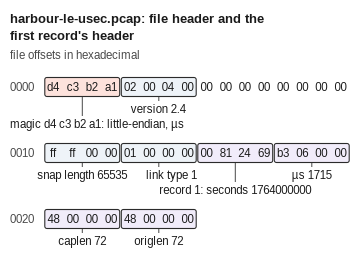
For your first read, use just the last row. caplen counts the bytes saved in the file. origlen counts the bytes originally sent. Here both are 72. If the recorder kept only part of the packet, advance by the saved count. Lesson 1 explains the other header fields.
Clone and start
You’ll need Git, Node.js 22 or newer and enough JavaScript to read a loop and write a function. These commands keep the course at the version used here and create a project/ folder for your analyser. Git ignores that folder. Copy it somewhere safe to back up your work.
git clone https://github.com/itsHabib/free-to-learn.git
cd free-to-learn
git switch -c my-packet-analyser 539df99884392fe1610c9114873b98dca04c4fe0
cd courses/packet-analyser
node lab.mjs start project write
node lab.mjs lesson project 1
The lesson pauses when it asks you to predict how your reader will handle a capture. Use the command it prints to save your answer and get feedback. Run node lab.mjs lesson project 1 again to continue.
Once you’ve written the two functions that read the file header and its packet records, run node project/peek/peek.mjs captures/harbour-le-usec.pcap. The analyser may first say it skipped a later lesson’s unfinished decoder. Look for the first record line. It should report record 1 at 1764000000.001715000 seconds, with 72 bytes saved. The project README also explains how to start with working functions or brief an AI coding assistant.
From a packet to a tide reading
Packets from one conversation can arrive out of order or carry bytes the sender has already sent. Put those bytes back in order, then write filters that let you ask which computer sent a particular request. For the final project, compare tide station messages to work out their format. Write a decoder for peek and a Lua plug-in that displays the same fields in Wireshark.
The course supplies synthetic recordings. You can run the JavaScript lab offline after cloning. The final plug-in check needs Wireshark 4.4 or newer and its command-line tool, tshark.